Maximizing Productivity with Obsidian: My Second Brain for Organizing Work Notes
🧠 Introduction to Second Brains & Brain Dumping
As I’m working with data all the time, I’m aware of the importance of keeping it in a safe and structured place, where it can be easily accessed when needed, which could be days, weeks or even years in the future. Thus, organizing my information, tasks, and notes is a key activity in my work (and personal) life. Without a clear system, I would feel lost in chaos, and my productivity would plunge (also considering that my memory sucks).
Today, I want to introduce you to two buzzwords related to the note taking: Brain Dumping and Second Brain. Brain Dumping is a technique that involves storing as quick as possible any useful data in a safe place, so it can be easily accessed and cleaned later and the brain can avoid worrying about them. For example, if you have a code snippet that helped you solve a problem, you can copy and paste it into a note in your “_TO_ORGANIZE” folder. When I’m free, usually at the end of the day, I cleanse the note, add some context to the code, and put them in the right section of my documentation tool. Some old-schoolers use post-it notes and agendas, I use Second Brains.
A Second Brain is a methodology for saving and systematically reminding us of the ideas, inspirations, insights, and connections we’ve gained through our experience. It expands our memory and our intellect using the modern tools of technology and networks. — Tiago Forte
This concept has given rise to tools like which are strucuted to help take note-taking to the next level. These tools, structured like wikis, extend the concept of Brain Dumping by making taking notes, connecting and structuring them a bliss, or in my special case, even a “fun” activity. The biggest players are Roam Research, Notion, and Obsidian, all with different characteristics but sharing the same core.
Personally, I love using Notion for my personal Second Brain because of its user-friendly UX. You may already know my deep love for Notion , which I use on my daily life and I contribute to the Python library. For starters, I recommend it thanks to its user-friendly UX, and it’s the go-to choice for my personal Second Brain. Sometimes I give access to part of my Notion wiki to other people and they immediately catch up with its structure.
However, for work, I’ve found that Obsidian is the way to go.
💼 Obsidian at work
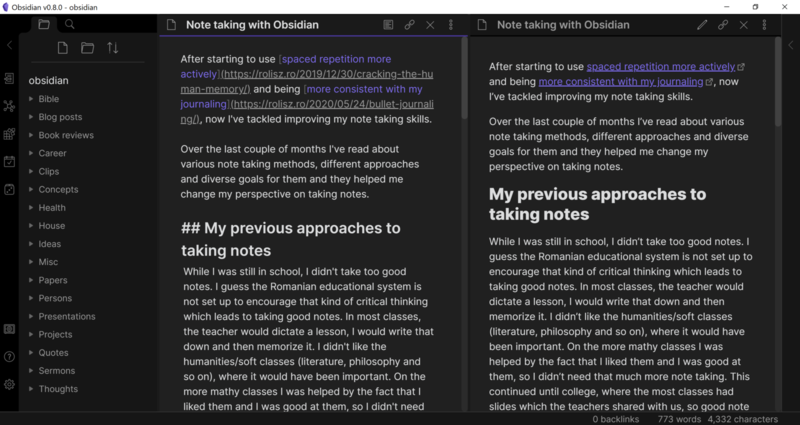
Unfortunately, Notion stores data on their servers without a self-hosted option and it doesn’t work offline, so putting sensitive data in there is out of question. Obsidian, differently, works completely offline (so unless you pay for a Premium service or use a shared directory you can’t access its notes from other devices). Its notes are “just” Markdown files (a special textual format with a specific syntax for basic customization) stored in the PC, just like .txt documents… And the program reads them like Notepad, super minimal and lightweight.
However, Obsidian notes have a singular characteristic that makes them particularly suitable in my current environment…
They are like neurons
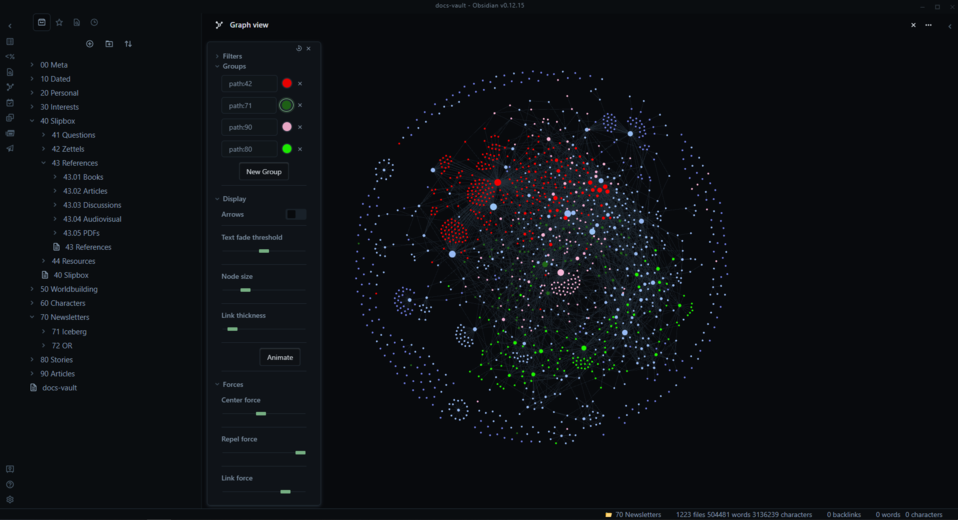
To put it plainly, Obsidian is literally a second brain. Notes don’t have to be structured in a folder and can be interconnected with hyperlinks, which creates an out-of-world experience for exploring and finding new relationships. And all it takes is mentioning the other file between brackets! A picture is worth a thousand words, and here is a typical Obsidian graph view that allows you to visually explore how notes are linked to each other.

☝ Why I have chosen Obsidian
My job is a constant juggling act of multiple large projects, meetings, tickets, and reports from various data sources. It’s a labyrinth of information that’s impossible to navigate without getting lost. But then, Obsidian comes to the rescue.
With its ability to link notes together, I can map out the entire flow of information and stay on top of everything. Here’s how I do it:
- Each meeting is linked to the relevant projects or open tickets.
- Each ticket is linked to the reports and data sources notes.
- Each data source is linked to its business logics and other data sources.
- Each project has documentation and links to all related meetings.
- Each script is linked to the ticket or project it’s been useful for.
- And so on, depending on the scenario.
Using Obsidian’s graph view, I can quickly access all the information connected to a single object. During meetings or whenever I gain new intel, I quickly jot it down using the “Brain Dumping” strategy and store it in Obsidian. Later, I organize the notes, link them together, and expand the wiki.
📁 A brief overview of the structure
My Obsidian vault is a treasure trove of information that I’ve decided to structure in a way that is easy for my colleagues to access. It’s a semi-structured schema with high flexiblity as it’s not required by Obsidian (it doesn’t even have a sort option) that helps to organize the wealth of information that I need to manage every day. With main folders and subfolders, I can easily navigate my way around and find what I need quickly.
Here’s a snapshot of my Obsidian vault structure:
- TO_ORGANIZE - this is where I store new notes by default before cleaning them up.
- Docs - where I keep all the important documentation that my team and I need to access quickly. This includes user guides, technical guides, checklists, and - information for Power BI reports, data sources, and other special cases.
- Projects - unique folders for each project that I’m working on. These folders usually contain other subfolders with additional information.
- Tickets - a comprehensive list of open and closed tickets, divided by department.
- Meetings - notes from all the meetings I attend, divided by department.
- Personal - a space for me to keep personal notes and scripts, divided by language and context. It’s also where I keep notes like this one.
- Old - a folder for older notes that I don’t need to access regularly.
- Media - the default folder where Obsidian stores all media files.
With this structure, I can easily find and access the information that I need. It’s a system that is not only efficient but also visually appealing. I could remove all the folders if I wanted to, but the structure helps to give a familiar feel to other users.
🔨 Plugins I use
There is a plethora of options available in the marketplace to enhance the Obsidian experience. While I prefer to keep things streamlined, here are a few plugins that I can wholeheartedly recommend:
- Editor Syntax Highlight: exceedingly helpful, especially when dealing with notes containing code snippets. It makes syntax highlighting a breeze, and makes the code much more readable.
- Excel to Markdown table: an absolute lifesaver when you need to copy data from Excel files. It takes care of all the formatting issues, saving you a ton of time and effort.
- Icon Folder: I love this plugin because it allows me to maintain the same aesthetic I was accustomed to in Notion, where every folder had a corresponding emoji. It’s a small touch, but it makes the interface much more enjoyable to use.
- Paste Image rename: If you’re someone who frequently pastes screenshots or other images into your notes, then it is an absolute must-have.
- Paste URL into selection: another one that replicates the functionality of Notion, and it’s a time-saver for me. It allows me to quickly paste a URL into a selected piece of text in my notes.
- Smart Typography: this plugin is all about the aesthetics, and it’s a small thing that makes a big difference. It makes minor typographic tweaks (like replacing hyphens with en-dashes), which makes the notes more visually appealing and easier to read.
- Copy Button for code blocks: a tiny addition that saves me a ton of time. It adds a copy button to code blocks, so you can quickly copy the code without having to highlight it and use the keyboard shortcut. I can’t understand why this functionality isn’t already built into Obsidian.
⛔ Obsidian limitations
At present, there are some limitations with Obsidian that are impacting my experience. Let’s take a closer look:
- Unfortunately, there is no option to share a note as a public link that can be accessed by others (web or within my organization). While I understand Obsidian’s focus on privacy and “private notes,” I do miss the convenience of being able to easily share a page as a link with a colleague or leave clickable shortcuts to links in a folder like in Notion.
- The PDF export feature is limited, and there’s no way to export notes in bulk. For instance, I’d like to automatically upload a PDF of some notes in a folder when I edit them with specific formatting. But unless I start learning LaTeX and pandoc, I’m unable to do so.
- Syntax formatting in code blocks isn’t enabled unless you have an outdated plugin that doesn’t even support DAX (Power BI’s script language) formatting. While I’m working on a plugin fork to address this issue, it’s a tedious process.
- While the Obsidian team is currently focused on the Canvas feature, which is a fantastic addition for those who previously used Graph.io and similar software, the frequency and impact of updates are slow due to the team’s small size. Thus, I doubt that my previous issues will be addressed quickly.
Moreover, I would strongly advise against using Obsidian if you are not fond of its neural structure, especially if your notes are not often interconnected. This is due to the fact that the learning curve can be steep, requiring the mastery of several shortcuts and a certain discipline in maintaining notes. If you neglect to organize your vault, it can quickly become overwhelming. It’s worth noting that if you’re not utilizing connections, you’re only tapping into half of Obsidian’s capabilities.
🥳 First Results
It’s been four months since I started using Obsidian, and it has already been a game-changer for me on multiple occasions. Initially, I was skeptical due to my love for Notion, but the adoption process was seamless, and my productivity has definitively increased. The most incredible thing about Obsidian is how I can instantly look back at past meetings connected to a particular topic and explore further, find connections, and expand my knowledge by examining other notes and reconstructing the entire scenario.
An excellent example that I presented in my proposal was a story about a user who raised a question during a brief meeting about an advanced Power BI feature. During the meeting, I took some notes on the issue, then created another note with a guide, and then another note about the following meeting where I introduced the guide. A few days later, I completely forgot where the guide was located, but I remembered the user’s happy reaction in the second-grade related note and traced my way back to the valuable document. I use this technique multiple times a day when searching for notes, and it saves me a lot of time piece by piece. Also, I don’t have to worry about restructuring notes when a project evolves; I can just link them together and embed updates of the project in a primary super note.

The most significant advantage, as mentioned in the introduction, is the ease of the “brain dumping” process. Whenever I come across new information, I can open Obsidian in one second, create a note with a shortcut, and jot down a few lines to be cleaned up later. My brain is now free to keep listening and learning without worrying about forgetting anything valuable. Yes, it’s a huge boost to my personal sanity and productivity.
Currently, I also have a few scripts that automate the process of cleaning links and organizing notes in my vault, as they are just a bunch of .md textual files in the end.
If you’re interested in this innovative way of organizing notes, then I recommend giving Obsidian a try. There are tools available for importing notes from Evernote, OneNote and Notion, so the transition is seamless. It takes a while to get used to Obsidian; personally, it took me a week to become familiar with the process, but then the fun began.
🔄 Addendum: three years later
Re-reading this post in 2026, I have to admit that most of the limitations I listed above are gone.
Sharing a note as a link was my biggest complaint back then, and now there are ways around it. It’s still not built in, but Obsidian Publish (paid) or one of the community sharing plugins let me send a colleague a link instead of exporting a file or pasting the whole markdown in a chat. Code blocks are also formatted properly out of the box, so no more patching that outdated plugin fork. In general, the tool matured a lot. Templates, properties and plugins are in much better shape, and I still open my vault every day.
The learning curve, though, is still there. The first weeks are a bit awkward, and the advice in the “Challenges and Lessons” section of my six-month update still holds: name your notes properly and clean the vault regularly, otherwise it quickly becomes a mess.
If you’re curious about how all of this changed now that AI can read the vault, I wrote about it in Second Brains in the AI era.